A few hours on your laptop should be enough to reveal the problem that laptop, tablet, and smartphone use creates.
Your head drifts forward, your shoulders round, and your neck starts carrying a load it was never meant to hold all day.
A laptop riser for better posture addresses that exact chain reaction by bringing the screen closer to eye level, which helps you sit taller and work with less cervical strain.
That sounds simple, but the details matter.
Not every stand improves posture in a meaningful way, and not every user needs the same setup. If you study from dense textbooks, switch between a laptop and printed material, or spend long blocks reading and writing at a desk, the right riser is less of an accessory and more of a structural upgrade to how you work.
Why a laptop creates posture problems so quickly?
The laptop’s strength is portability. Its weakness is geometry. The screen and keyboard are attached, which forces a compromise. If the keyboard is low enough for your wrists, the screen is too low for your neck. If you raise the screen to eye level without changing anything else, the built-in keyboard becomes too high and awkward to use.
That is why so many people end up in a forward-head posture. They are not careless. They are adapting to a tool that asks the neck, shoulders, eyes, and hands to work at conflicting angles.
Over time, that position can lead to neck tightness, upper back fatigue, and a general drop in focus. For students and professionals doing serious desk work, the effect is not only physical discomfort. It is reduced endurance. You lose concentration sooner when your body is working against your task.

What a laptop riser for better posture should actually do
A useful riser does more than elevate a device. It changes the relationship between your eyes, spine, and desk. The best setup places the top portion of the screen near eye level, so you can look forward rather than down for most of the day.
That adjustment helps reduce the tendency to collapse through the chest and crane through the neck. It also improves visual ergonomics. When the screen sits too low, you often compensate by bending your neck and bringing your face closer to the display. Raise it properly, and you create space for a more neutral posture.
But elevation alone is not enough. Stability matters just as much. A riser that wobbles when you type, sags under weight, or shifts during use creates tension of its own. Serious work demands a platform that feels fixed, not flimsy.
The trade-off most buyers miss
Here is the key trade-off: the higher you raise a laptop, the less practical it becomes to type directly on the built-in keyboard for long sessions. That means the best ergonomic results usually come from pairing a riser with an external keyboard and mouse.
Some people resist that because they want a minimal setup. Fair enough. If your sessions are short or highly mobile, a compact stand without peripherals may still be a worthwhile improvement. But if you are working for hours, writing extensively, or reading closely, a full workstation arrangement is usually the better answer.
This is especially true for graduate students, researchers, legal professionals, and anyone moving between source material and screen-based work. Once the laptop is elevated correctly, the keyboard needs to come back down to desk level where your shoulders can stay relaxed and your elbows can rest in a more natural position.
How to choose a laptop riser for better posture?
The first question is height range. Many stands advertise adjustability but only offer modest lift. For real posture improvement, you need enough elevation to position the screen appropriately for your body and desk. Taller users in particular should pay attention here.
The second question is load-bearing stability. If a stand cannot confidently support a heavier laptop, a thick textbook, or frequent repositioning, it will become a weak point in your workspace. This matters even more if you want one platform to support multiple tasks rather than just occasional laptop use.
The third question is angle control. A stand that lets you refine both height and tilt can improve readability and reduce glare, especially when you alternate between reading and typing. That flexibility becomes valuable in long study sessions, where small adjustments can make a major difference in comfort.
The fourth question is the build quality. Aluminum joints and a broad base tend to outperform lightweight folding designs that prioritize portability over performance. There is nothing wrong with portable options, but they solve a different problem. If your goal is posture correction during serious desk work, structural strength should outrank convenience.
Why serious readers need more than a basic stand
Many laptop stands are designed for casual users. They work well enough for checking email, watching a video, or creating a cleaner desk aesthetic. They are less impressive when the workload is demanding.
If you regularly use heavy textbooks, legal binders, tablets, notebooks, or printed study materials alongside your computer, the stand has to do more than lift a thin device. It has to remain stable under real pressure and repeated adjustment.
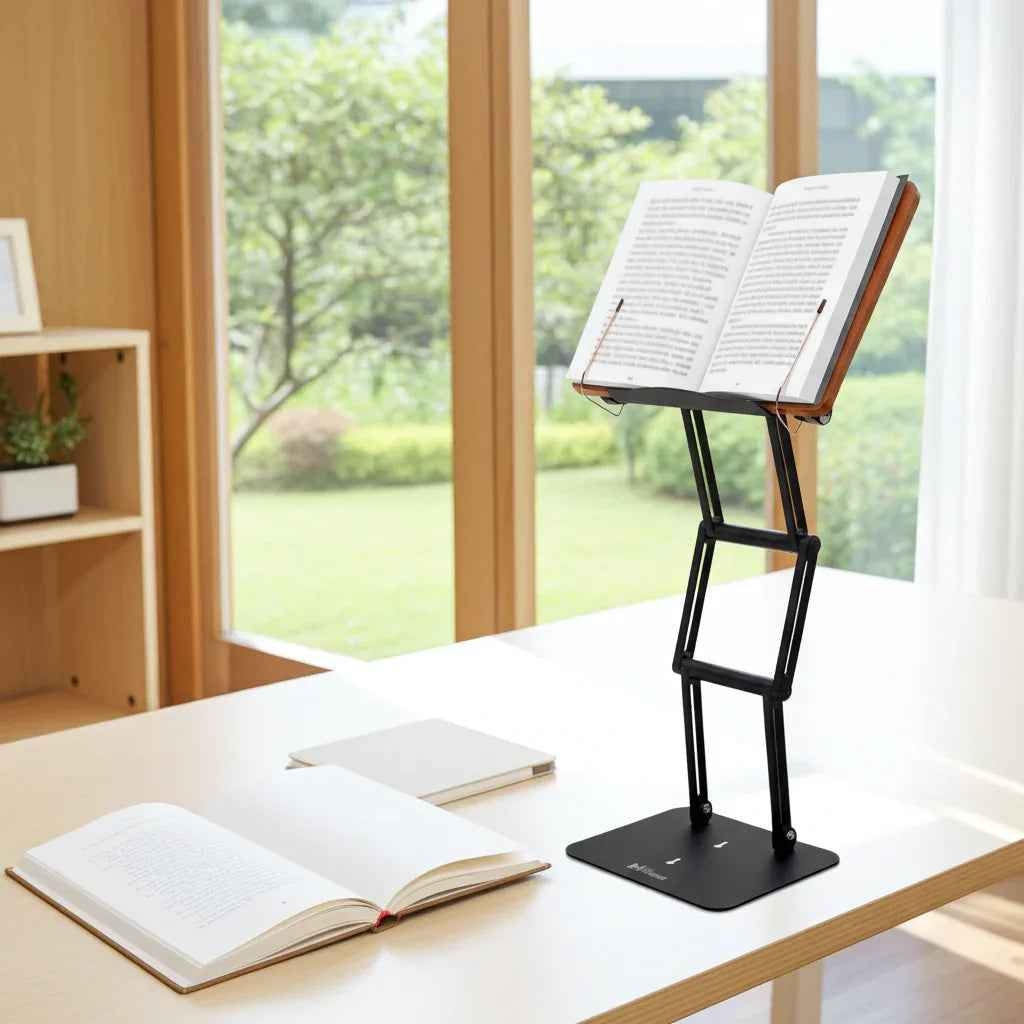
This is where a premium platform earns its place. A well-engineered stand can function as a laptop riser, book stand, tablet holder, and elevated reading surface in one. That is not a luxury for serious readers. It is a way to keep reference material at a usable height instead of forcing constant downward neck flexion.
The traditional shtender solved a version of this problem long before modern ergonomics gave it clinical language. Raise the text, support the body, and sustain attention. The principle still holds. Today’s best ergonomic stands simply apply that wisdom to laptops, tablets, and dense academic materials with stronger materials and broader adjustability.
A better workstation is about focus, not just comfort
People often shop for ergonomic tools once pain appears. That makes sense, but comfort is only part of the benefit. A well-positioned screen and reading surface also support concentration.
When your neck is not constantly flexed and your shoulders are not bracing against poor setup, your body stops competing with your mind for attention. Reading becomes easier to sustain. Writing feels less interrupted. Deep work lasts longer.
That is why posture equipment should be judged by performance as well as relief. Does it support long sessions? Does it reduce repositioning and fidgeting? Does it make intellectually demanding work easier to maintain? Those are the standards that matter for scholars, professionals, and committed students.
One setup, several use cases
The ideal riser is not locked into a single task. On one day, it may hold a laptop for remote work. On another, it may support a medical text, a legal volume, lecture notes, or a tablet for marked-up reading.
That versatility matters because posture problems do not come only from computer use. They come from hours spent looking down at anything. If your stand can support both digital and print workflows at eye level, you gain more than convenience. You create a desk setup that stays ergonomically sound across the full span of your work.
This is one reason premium adjustable stands stand apart from commodity options. They are built for repeated use, heavier loads, and users who expect equipment to hold its position without hesitation. For a serious workspace, that distinction is not cosmetic. It is functional.
When a laptop riser is not enough by itself
A riser improves screen position, but it cannot fix every ergonomic issue. Chair height, desk height, monitor distance, and keyboard placement still matter. If your feet are dangling, your wrists are bent upward, or your elbows are constantly lifted, the setup still needs work.
It also depends on how you use your laptop. If you spend most of your day in active typing, external accessories become far more important. If your work is reading-heavy, a stand with strong tilt support may matter more than keyboard separation. Good ergonomics is rarely one-size-fits-all.
That said, elevating the screen or reading surface is one of the fastest, most noticeable improvements most desk workers can make. It addresses a common problem at its source: the persistent downward gaze that pulls the head and spine out of alignment.
For users who want one serious platform instead of a rotating collection of temporary fixes, a stand like Dr. Shtaygen’s Stander 1.1 reflects the right design philosophy - high elevation, strong joints, reliable support, and enough stability for real academic or professional use.
The best posture upgrade is often the one that quietly changes your working position every single day. Raise the screen, raise the text, and let your body stop paying the price for focused work.