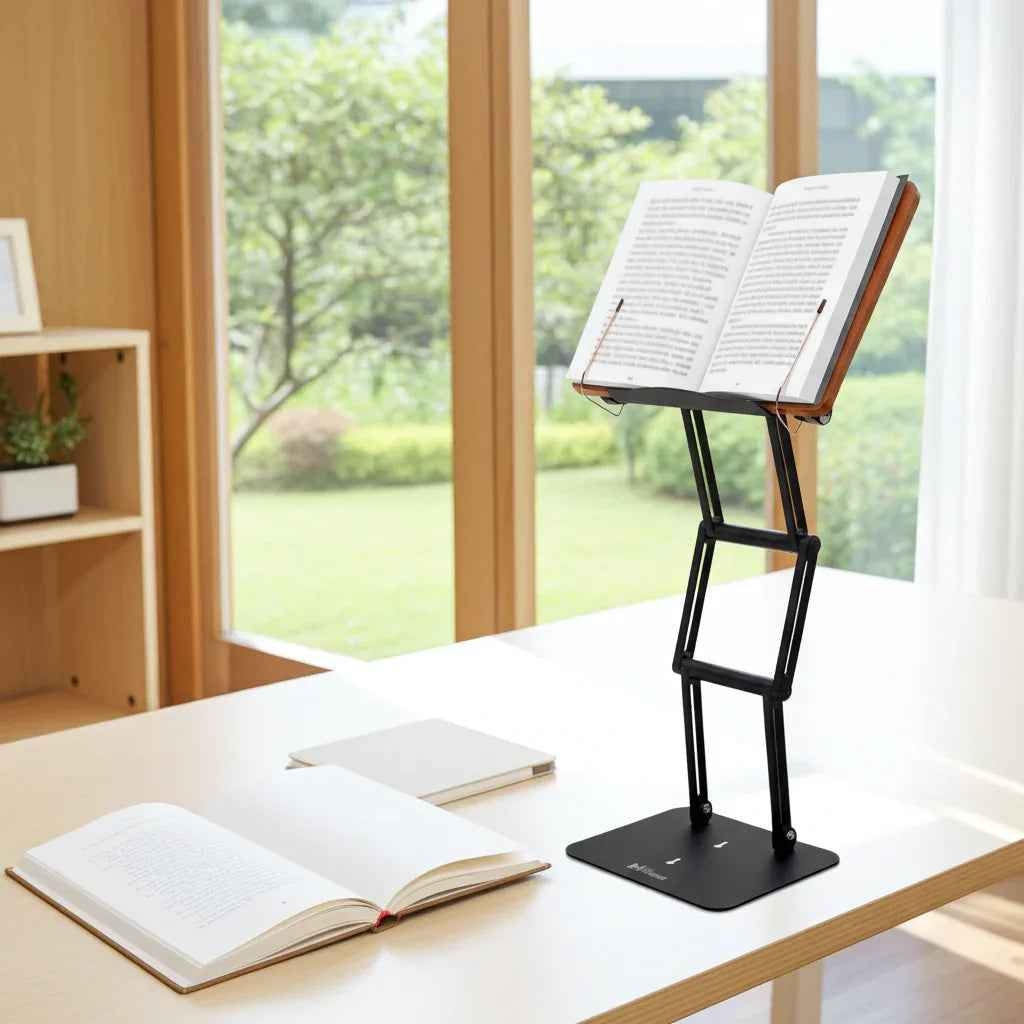
If your shoulders creep forward by noon and your neck feels compressed after a few hours on a laptop, you do not have a laptop problem alone. You have a screen-height problem. That is the real lens for any ergonomic laptop stand review. The question is not whether a stand looks sleek on a desk. The question is whether it raises your work to a position your spine can tolerate for long stretches without fatigue, strain, or constant adjustment.
Most laptop stands promise better posture. Many deliver only a partial fix. They lift the screen a few inches, improve airflow, and make a desk look cleaner. For light use, that may be enough. For serious study, drafting, analysis, reading, or daily desk work, it usually is not. A useful review has to focus on what actually matters under load: height range, stability, adjustability, viewing angle, build quality, and whether the stand supports real work instead of occasional convenience.
What matters in an ergonomic laptop stand review
The first priority is screen elevation. Ergonomics starts when the top portion of your screen sits near eye level. If a stand cannot get the laptop high enough, it cannot do the main job. Many low-cost stands improve the angle of the keyboard but still leave you looking downward. That may reduce wrist extension for some users, but it does not meaningfully reduce cervical flexion.
The second priority is stability. A stand can have an impressive height spec on paper and still fail in practice if it wobbles under normal typing pressure or shifts when you adjust the angle. This is especially relevant for heavier laptops, larger tablets, and users who alternate between reading, typing, and presenting. Instability creates friction. Friction breaks focus.
The third factor is adjustability with purpose. A stand should support more than one posture. A fixed incline may work for a coffee shop session, but a serious workstation benefits from flexible height and angle control. That matters even more if you move between seated work and moderate standing use, or if you use the same platform for a laptop in one session and a textbook or reference volume in the next.
Build quality also deserves more attention than it gets. Lightweight stands made for portability can be useful, but they often trade away rigidity, long-term durability, and confidence under heavier loads. For professionals, students, and scholars working through dense material for hours at a time, a stand should feel like equipment, not an accessory.
The real weakness of most laptop stands
The weak point in many ergonomic stands is that they are designed around the idea of a laptop as a light device for intermittent use. That is not how many people actually work. Graduate students lean over large books and open laptops side by side. Researchers move between PDFs, handwritten notes, and physical references. Professionals spend half the day in documents, spreadsheets, and video calls. Religious scholars may need a raised platform suitable for substantial printed texts, not just thin electronics.
This is where many popular stands start to look less impressive. They may handle a tablet or ultrabook well enough, but they struggle with larger devices, aggressive height adjustments, or heavier materials. They are often optimized for portability and aesthetics rather than for posture correction and sustained performance.
That trade-off is not always wrong. If you travel constantly and need something ultra-light, a minimal stand may fit your life. But if your actual goal is to reduce neck strain and build a more durable study or work setup, the stand has to be judged by a stricter standard.
Ergonomic laptop stand review: performance over novelty
A serious ergonomic laptop stand review should reward products that solve the physical problem, not just the visual one. The strongest stands do three things well. They elevate the screen meaningfully, remain stable at working height, and support multiple use cases without feeling compromised.
That last point matters more than many buyers realize. The best stand is often not a single-purpose laptop pedestal. It is a platform that can hold a laptop, a dense textbook, a legal volume, a tablet, or printed notes at an effective viewing angle. This allows you to keep important material elevated instead of dropping your gaze repeatedly to the desk. From an ergonomic standpoint, that repeated downward movement adds up.
A well-built adjustable stand also tends to age better. Joints stay tighter. The platform resists flexing. The device feels planted rather than temporary. These are not luxury details. They are the mechanics that determine whether you will keep using the stand six months later.
Who benefits most from a premium stand
Not every user needs a heavy-duty stand. Someone checking email for an hour each evening has a different threshold than a law student, physician, accountant, engineer, or yeshiva student spending long stretches at a desk. The more time you spend reading or working from a screen, the more valuable real adjustability becomes.
A premium stand makes the most sense for people who do cognitively demanding work and need their setup to disappear into the background. That includes students in exam periods, academics working through source material, remote professionals in all-day computer workflows, and serious readers who want a better posture environment without improvising with stacks of books.
It is also particularly useful for users who work across formats. If your day includes a laptop, a notebook, printed papers, and occasionally a heavy reference text, a stronger stand can unify the workspace. Instead of adapting your body to each object, you bring each object up into a healthier visual field.
Where many reviews miss the mark
Many product roundups overvalue convenience features and undervalue biomechanical effect. They praise foldability, color options, and compact storage, then treat screen height and wobble as minor details. That framing may work for casual buyers, but it misses the core ergonomic issue.
A stand should be assessed the way any serious tool is assessed: by how well it performs under the conditions it was bought for. If you need long-form reading, writing, coding, analysis, or study support, a stand that looks elegant but shakes during use is not well designed for your purpose. If it tops out below comfortable eye level, it is not truly solving the problem.
This is also why product photos can be misleading. A stand may appear highly elevated in an image while offering only moderate practical height once a laptop is on it. Others use narrow support surfaces or weak joints that feel acceptable at first and less acceptable over time. Reviews that focus on first impressions instead of sustained use often miss these issues.
What a stronger alternative looks like
The better category is a professional-grade adjustable platform. These stands use sturdier materials, stronger joints, and a wider range of height positions. They are built for work sessions, not just desk styling. In practice, that means better support for heavier devices, more confidence during use, and more useful elevation for the neck and upper back.
This is where a product like The Stander 1.1 enters the discussion naturally. It is not built like a typical thin consumer stand. It is designed as a serious raised platform for study and desk work, with the structural integrity to support laptops, textbooks, tablets, and other materials that defeat flimsier stands. That distinction matters because the ergonomic goal is the same across all of those tasks: bring the material closer to eye level and reduce the amount of sustained downward head posture.
There is also an important functional advantage in using one elevated platform across different work modes. A student can move from a laptop to a chemistry text. A professional can switch from a spreadsheet to marked-up printed documents. A scholar can use the same stand as a modern shtender for extended reading. When the stand remains stable and adjustable through all of that, it becomes part of a better workflow, not just a single-purpose accessory.
Is a laptop stand enough on its own?
Sometimes yes, sometimes no. If you use the laptop screen primarily and pair the stand with an external keyboard and mouse, an ergonomic stand can dramatically improve your setup. If you keep typing on the raised laptop keyboard itself for long periods, the result is mixed. Your neck may improve while your shoulders and wrists take on new strain.
That does not make the stand ineffective. It just means ergonomics is a system. The stand sets the screen height. Input devices and chair height complete the picture. For many users, the stand is still the highest-impact upgrade because it corrects the most obvious and damaging viewing angle first.
A better standard for buying
If you are comparing options, resist the temptation to judge by price alone. A cheaper stand is not cheaper if it ends up unused because it wobbles, sits too low, or cannot handle your daily materials. Likewise, the lightest stand is not always the most ergonomic one. Serious work often requires serious support.
The right purchase depends on how you work. If your stand is mainly for travel or occasional video calls, a basic option may be enough. If you need dependable elevation, a stable writing and reading platform, and support for long focused sessions, you should look for engineering over novelty and structure over minimalism.
A good stand does more than hold a device. It changes the way you occupy your desk. When your screen or text rises to meet your eyes, concentration lasts longer and discomfort stops setting the pace of your day.