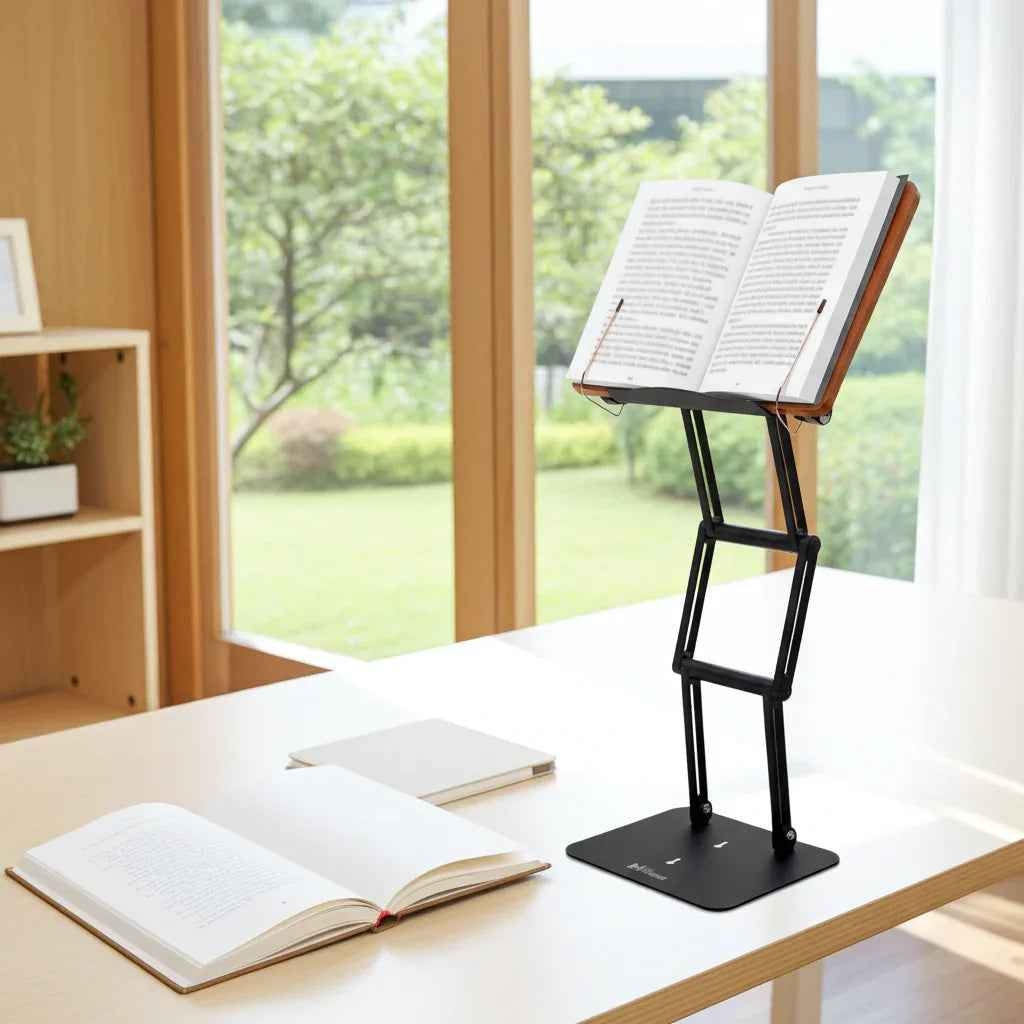
If your neck starts aching 20 minutes into a reading session, the problem usually is not your discipline. It is your setup. Learning how to read at eye level is one of the simplest ways to reduce cervical strain, maintain better posture, and stay focused longer without constantly shifting in your chair.
Most people read with the material flat on a desk, lap, or table. That forces the head forward and down, which increases the load on the neck and upper back. A few degrees may not seem significant in the moment, but over an hour of study, drafting, or close reading, the strain adds up. That is why eye-level reading is not a luxury for serious work. It is a structural correction.
Why reading below eye level causes fatigue
The human head is heavy enough that posture matters immediately. When your book or screen sits too low, your neck flexes forward. Your shoulders tend to round, your upper back follows, and your breathing often gets shallower. The result is familiar: neck tightness, shoulder fatigue, lower concentration, and the subtle urge to stop working before the work is done.
For students and researchers, this matters because reading is rarely a five-minute activity. It is often sustained effort with dense material, note-taking, page-turning, and repeated visual focus. For professionals, it shows up in long document review, laptop work, and extended screen time. For religious and scholarly study, where texts may be large and sessions intentionally prolonged, support and elevation become even more important.
There is a trade-off here. Looking perfectly straight ahead all the time is not realistic, and it is not even necessary. The goal is not rigid posture. The goal is to keep your reading material high enough that your neck stays in a neutral range, with only a slight downward gaze from the eyes rather than a prolonged bend from the spine.
How to read at eye level in a real workspace
A workable setup starts with the reading surface, not the chair. If the book, textbook, tablet, or laptop remains low, everything else becomes compensation.
Raise the material so the top half of the page or screen sits near eye height. For most people, the ideal position places the center of the content just slightly below the horizontal line of sight. That allows natural eye movement without forcing the chin down. If you are reading a large textbook, the height may need to be adjusted as you move through the page. If you are using a laptop, you may need a separate keyboard to maintain this position comfortably.
The angle matters almost as much as the height. A flat book on a tall stack is still not ideal because you are still looking downward at the page surface. Tilting the material toward you reduces neck flexion and also improves visual access. This is one reason traditional raised study platforms have endured for centuries. The basic principle is sound: bring the text up and toward the reader.
Distance matters too. If the material is too close, you tend to hunch. If it is too far, you lean forward. A good starting point is roughly an arm's length for screens and somewhat closer for printed text, depending on font size and vision. The right distance is the one that lets you read clearly without projecting your head forward.
The posture that supports eye-level reading
Once the material is positioned correctly, your body has a chance to do less work. Sit with your feet grounded and your pelvis supported by the chair rather than perched at the edge. Let your shoulders settle instead of pulling them back aggressively. Your elbows should rest comfortably near your sides if you are typing or taking notes.
This is where people often overcorrect. They try to sit bolt upright with military stiffness, then fatigue just as quickly. Better posture is not forced tension. It is supported alignment. If the stand height, screen angle, and chair position are correct, neutral posture becomes easier to maintain without constant effort.
Standing can also work well for reading, especially during shorter sessions or when rotating between tasks. But standing does not automatically fix ergonomics. The material still needs to be elevated to eye level, and the stand must remain stable under the weight of the item. A wobbly platform defeats the purpose because it interrupts concentration and encourages awkward adjustments.
How to read at eye level with books, laptops, and tablets
Different tools create different ergonomic problems.
Printed books are often the worst offenders because they are usually placed flat and low. Thick textbooks and reference volumes are especially difficult because they are heavy, wide, and prone to closing or shifting. Reading them at eye level requires a stand with enough elevation and enough structural stability to hold real weight, not just a lightweight paperback.
Laptops create a split problem. If you place the screen at eye level, the keyboard rises too high for comfortable typing. If you keep the keyboard at desk level, the screen drops too low. For light reading or short sessions, elevating the laptop can help. For sustained work, a separate keyboard and mouse are usually the better answer.
Tablets are easier to elevate but often lead to prolonged neck flexion because they are casually used on laps, couches, and low desks. They benefit from the same principles as books and screens: sufficient height, a readable angle, and stable positioning.
For mixed workflows, one adjustable platform is often the most efficient solution. A serious stand should do more than prop something up. It should hold heavy materials securely, adjust high enough to reduce cervical strain, and remain steady through page turns, note-taking, and long sessions. That is the difference between a true ergonomic tool and a temporary fix.
Common mistakes that undermine an eye-level setup
One common mistake is relying on improvised stacks of books or boxes. These can raise the material, but they rarely provide the right angle or stability. They also clutter the desk and become frustrating to adjust.
Another is assuming that any stand will do. Many low-cost stands are made for light tablets, not dense textbooks, large legal volumes, or serious laptop use. Under real working conditions, they slip, shake, or sag. That instability breaks focus and often leads users back to poor posture simply because it feels less annoying.
A third mistake is ignoring visual comfort. If your lighting creates glare, or if the text is too small from the new position, you may still crane your neck forward. Ergonomics is not only about body mechanics. It is also about making the material easy to see and use.
Finally, people often set the height once and never revisit it. But posture changes by task. Close annotation, passive reading, and dual-screen work may each need slightly different positioning. The right setup is adjustable, not fixed.
What serious readers should look for in a stand
If you read daily and for long stretches, the stand is not a minor accessory. It is load-bearing equipment for your neck, shoulders, and concentration.
Look for enough vertical range to bring material truly near eye level, not just a little higher than the desk. Look for durable joints that hold position under weight. Look for a platform wide and strong enough for substantial books and stable enough for moderate standing work. If your workflow shifts between textbooks, tablets, and a laptop, versatility matters. If your sessions involve page-turning, writing, or study with heavier volumes, stability matters even more.
This is where premium engineering earns its place. A stand designed for serious study can support both posture and performance in ways flimsy alternatives cannot. Products like The Stander 1.1 are built around that exact problem: lifting substantial reading material high enough to support neutral neck position while remaining stable enough for real academic and professional use.
The payoff of reading at eye level
The immediate benefit is usually less neck tension. The longer-term benefit is that you preserve energy for the work itself. Better positioning reduces the background drain of discomfort, fidgeting, and muscular fatigue. That often leads to longer focus, better reading endurance, and a workspace that feels more deliberate.
It also changes the quality of study. When the text is properly presented, you are less likely to collapse into it physically. That creates a more upright, attentive posture that supports concentration. For some readers, especially those working with demanding or sacred texts, that physical orientation also brings a greater sense of seriousness and presence.
Learning how to read at eye level is not about making your desk look more refined, although it often does. It is about giving your body a setup that matches the seriousness of your work. When the material meets your eyes instead of pulling your spine downward, reading stops feeling like a strain you endure and becomes something you can sustain.