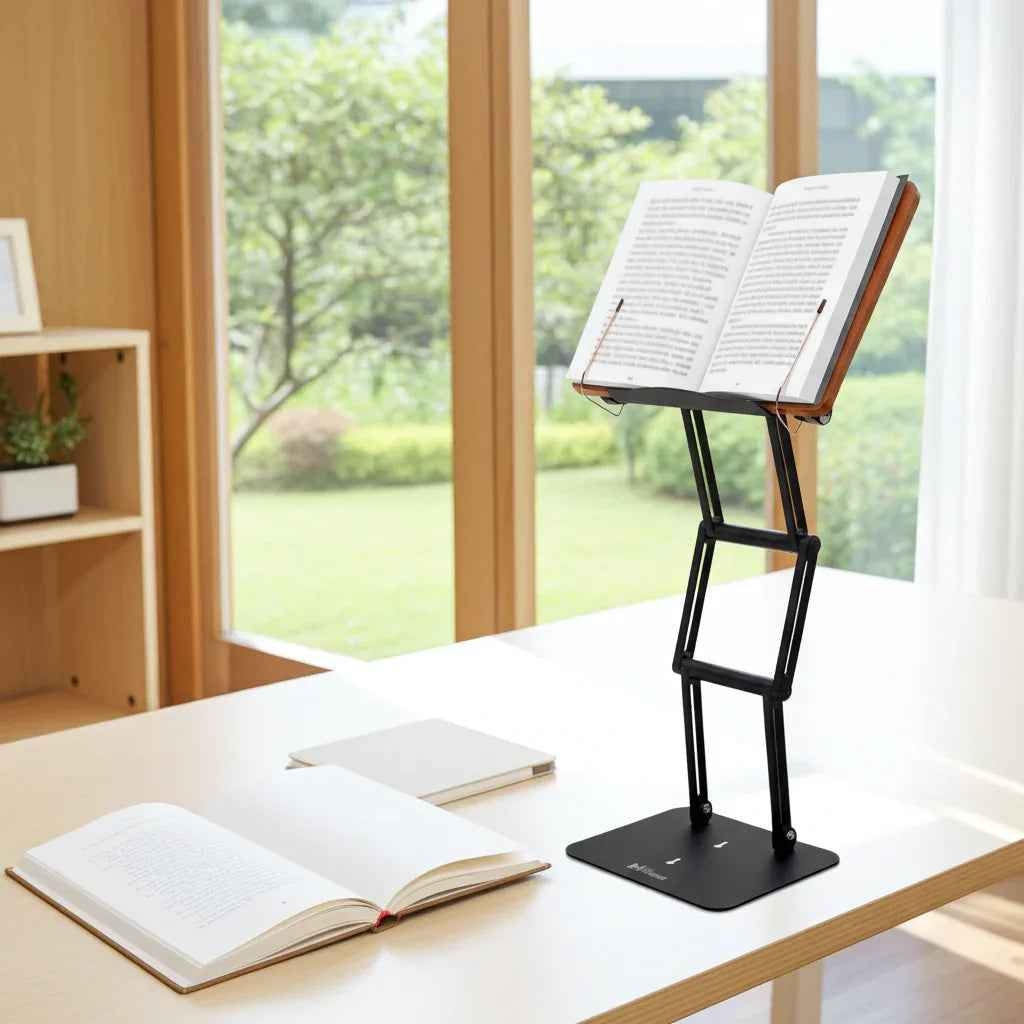
A sore neck at 3 p.m. is rarely a motivation problem. More often, it is a workspace problem. The best tools for healthy desk posture do not force your body into a stiff, perfect position. They bring your books, screens, and writing surface into better alignment so your spine is not doing extra work all day.
That distinction matters. Most people do not lose posture because they are careless. They lose posture because they spend hours looking down at a laptop, hunching over a textbook, or reaching forward to see a second screen. If you read, write, study, code, research, or review documents for long stretches, posture is not just a comfort issue. It affects fatigue, concentration, and how long you can work without pain.
What the best tools for healthy desk posture actually do
A good ergonomic setup does three jobs at once. It raises your visual target closer to eye level, supports your limbs so muscles are not bracing unnecessarily, and reduces the need to crane, slump, or lean forward.
That is why posture tools work best as a system rather than a single purchase. A premium chair helps, but not if your laptop is six inches too low. A standing desk can help, but not if you still spend the day looking down at papers. The most effective setup usually combines elevation, support, and adjustability.
There is also a practical reality here. The right tool depends on what you spend the most time doing. Someone who works primarily on a monitor needs a different solution than a law student buried in casebooks or a religious scholar studying from large printed texts. Healthy posture is not one-size-fits-all. It is task-specific.
1. An adjustable reading and laptop stand
If there is one tool that changes desk posture fastest, it is an adjustable stand that lifts books, laptops, and tablets to a proper viewing height. This addresses one of the most common sources of strain: sustained downward neck flexion.
When your material sits flat on the desk, your head naturally drops forward. That position may feel harmless for a few minutes, but over hours it increases load on the cervical spine and encourages rounded shoulders. Raising the material changes the entire chain. Your head stays more upright, your chest stays more open, and your eyes meet the work instead of chasing it downward.
This is where many low-cost stands fall short. They may hold a thin tablet, but they wobble under a textbook or lack the height needed for true eye-level reading. Serious users need more than a prop. They need stable elevation, durable joints, and a platform that can handle dense books, laptops, and long sessions without sagging.
For readers, students, and scholars, this category often delivers the biggest posture benefit per square inch of desk space. A well-built stand also supports workflow, not just comfort. You can annotate, read, type, and reference material with less interruption and less physical collapse over time.
2. An external keyboard and mouse
A stand alone is not enough if you are using a laptop for primary work. Once the screen goes up, the built-in keyboard and trackpad move too high for healthy arm position. That is why an external keyboard and mouse are essential companions.
This pairing lets you separate screen height from hand height. Your screen can sit at a more natural visual level while your elbows remain close to your sides and your wrists stay relatively neutral. Without that separation, users often trade neck strain for shoulder tension.
The trade-off is desk space. External accessories add clutter if your setup is already tight. Still, for anyone spending multiple hours a day on a laptop, this is not a luxury purchase. It is the difference between a partial fix and a workable ergonomic system.
3. A chair with real adjustability
People often talk about posture as if it begins with the spine alone. In practice, posture is heavily influenced by what the pelvis and lower body are doing. A chair that supports a stable seated position makes it easier to maintain neutral alignment without constant effort.
Look for seat height adjustment first. Your feet should rest flat with your knees roughly level to slightly below your hips. Lumbar support matters too, but it is frequently oversold in isolation. If the chair height is wrong or the desk is too high, even excellent lumbar support cannot fully compensate.
This is also where budget decisions become nuanced. An expensive chair is not automatically better for your body than a simpler chair that fits you well. For many desk workers, a moderately priced chair with correct adjustment beats a premium chair used incorrectly.
4. A footrest, when the desk or chair is not ideal
A footrest sounds minor until you use one in the right situation. If your desk height forces you to raise your chair and your feet no longer sit firmly on the floor, a footrest restores lower-body support and reduces the tendency to slide forward or perch.
That matters because unsupported feet subtly destabilize the entire seated posture. Once the legs lose support, the pelvis often tilts, the lower back loses its base, and the upper body starts compensating. Many people blame their shoulders or neck when the problem actually starts lower down.
A footrest is not necessary for everyone. If your chair and desk already put you in a balanced position, it may do very little. But for shorter users, fixed-height desks, and long seated sessions, it can be one of the most cost-effective posture upgrades available.
5. A monitor arm or monitor riser
For users working primarily from a desktop monitor, monitor placement is a central issue. If the screen is too low, you drift forward. If it is too far away, you jut your head to read. If it is off-center, you rotate repeatedly through the day.
A monitor arm offers the most flexibility because it allows precise control over height, distance, and angle. A riser is simpler and often cheaper, but it only solves the height problem. Which one makes sense depends on how often your setup changes and how exact you need the positioning to be.
For multi-screen users, this becomes even more important. Two poorly placed monitors can create a day of asymmetrical posture. If one screen is primary, place it directly in front of you and let the secondary screen remain secondary. Do not force your neck to spend eight hours negotiating an awkward layout.
6. A document holder for paper-based work
This is one of the most overlooked tools for healthy posture. If you routinely work from printed notes, textbooks, legal pads, research articles, or sacred texts, desk-level paper creates the same downward strain as a low laptop.
A document holder keeps source material elevated and closer to your line of sight. That reduces repetitive nodding and the constant visual shift between screen, keyboard, and desk. For editing, studying, bookkeeping, and research-heavy workflows, this can noticeably reduce fatigue.
In some setups, a heavy-duty adjustable stand can effectively replace a basic document holder by doing far more. It can hold the actual working material at substantial elevation, support heavier loads, and function across books, tablets, and laptops instead of paper alone. For serious reading and study, that added capability matters.
7. A sit-stand desk, used with discipline
A sit-stand desk can be valuable, but it is often misunderstood. Standing is not automatically superior to sitting. The benefit comes from variation, not from locking yourself into an upright position for hours.
Used well, a sit-stand desk gives you more movement options and can reduce the monotony of static posture. Used poorly, it simply moves the same bad habits into a standing position. People still lean forward, round their shoulders, and look down at low devices while standing.
That is why a sit-stand desk is best seen as a platform, not a cure. It works when the rest of the setup is also correct, especially screen elevation and input placement.
Building the right posture setup for your work
If your day revolves around reading and studying, start with elevation. An adjustable stand is usually the highest-impact purchase because it directly addresses prolonged downward gaze. If your day revolves around typing, pair that elevation with an external keyboard and mouse. If your discomfort worsens over long seated sessions, examine chair height, foot support, and monitor placement before assuming you need a total office overhaul.
For many serious users, the strongest setup is not the most complicated. It is a stable, elevated platform for the material you actually use, combined with support tools that keep your body from adapting around poor geometry. That is one reason premium adjustable stands have become central to high-performance desks. A product like The Stander 1.1 is not just a book stand or a laptop riser. It solves the core posture problem at its source by bringing serious reading and work materials up where they belong.
The best posture tool is the one that removes strain from the task you repeat every day. Fix that task first, and your desk starts working with your body instead of against it.