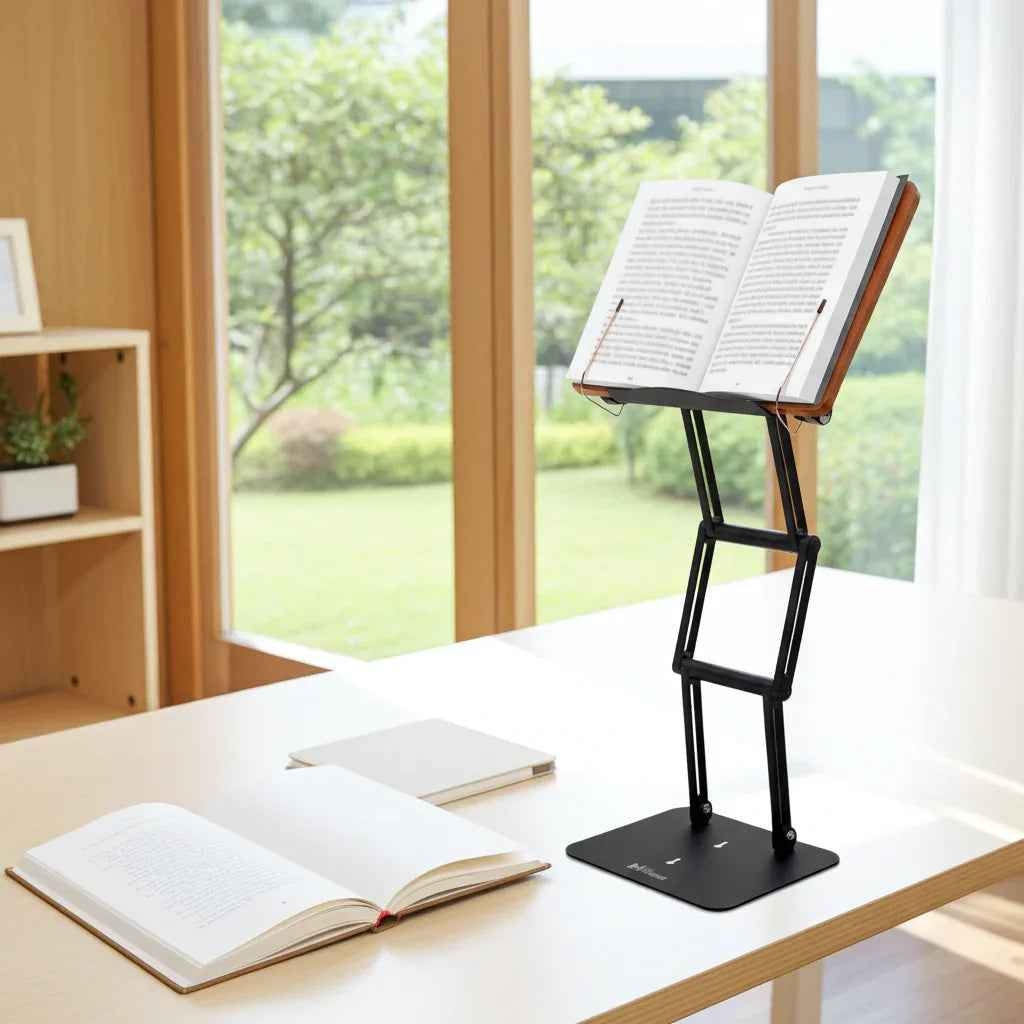
If your shoulders creep upward by noon, your chin juts forward by 2 p.m., and the base of your neck feels hot and tight by evening, the problem may be simpler than it looks. A desk too low... neck pain solution often starts with one overlooked fact: when your work surface sits below your natural visual and arm position, your body spends hours collapsing toward it.
That collapse is not just a posture issue. It is a mechanical problem. A low desk encourages neck flexion, rounded shoulders, thoracic slumping, and a constant forward reach. Whether you are reading dense textbooks, reviewing legal documents, studying religious texts, or working from a laptop, the result is the same - your cervical spine absorbs strain it was never meant to carry all day.
Why a low desk creates neck pain
Most people assume neck pain comes from the neck alone. In practice, it usually starts lower. When the desk is too low, your upper back rounds to meet the task. Once the thoracic spine drops forward, the head follows. Because the head is heavy, even a modest forward tilt increases the load on the muscles that hold it up.
That means your neck extensors, upper traps, and muscles around the shoulder blades stay active for far too long. You may feel stiffness near the base of the skull, tension between the shoulders, or numbness and fatigue spreading into the arms. For serious desk users, this is rarely random. It is predictable ergonomics.
The issue becomes worse when the object you are using sits even lower than the desk itself. A laptop on a low desk is a common example because the screen and keyboard are fixed together. To type, you lower your hands. To see, you lower your head. Your body pays for both.

The real desk too-low neck pain solution
The most effective fix is not to force perfect posture by willpower. That rarely lasts. The real desk too-low neck pain solution is to raise the work to meet your body, especially the visual target. Once the reading surface or screen moves closer to eye level, the neck can return to a more neutral position without constant effort.
This matters for more than comfort. Neutral alignment improves breathing mechanics, reduces static muscle loading, and helps you sustain focused work longer. If your day involves deep reading, annotation, writing, or switching between print and digital materials, height is not a luxury feature. It is a performance variable.
That does not always mean replacing your desk. In many cases, the better move is to elevate the thing you are looking at rather than the entire workstation. In the case of laptops and tablets, a stable, adjustable stand can correct the visual height problem with far less disruption than buying new furniture.
Start with the object, not just the chair
Many people respond to neck pain by adjusting the chair first. Sometimes that helps, but it can also create new problems. If you raise the chair while leaving the desk low, your knees and hips may feel cramped. If you lower the chair to match the desk, your screen and reading material fall even farther below eye level.
The same is true when using a standing desk, actually. If you raise your body but keep your laptop, book, or whatever relatively at the same height as before you stood up, then you've tried an expensive solution to a problem you haven't solved.
The smarter sequence is to identify the primary source of downward gaze. Is it a laptop screen, a textbook, a tablet, handwritten notes, or all of them? Once you know what it is that's pulling your head down, you can elevate that specific task and finally solve the real issue.
For reading-heavy work, a raised angled platform is often the fastest improvement. It brings the page upward, reduces neck flexion, and shortens the reach distance. For laptop work, elevation helps too, though it works best when paired with an external keyboard and mouse so your hands can stay lower while the screen comes up.
What proper height actually looks like
Ergonomic advice often sounds vague because people hear terms like eye level and neutral spine without knowing what to do with them. In practical terms, your neck should not need to bend downward for long stretches to see the material clearly. Your shoulders should stay relaxed rather than lifted or rounded. Your elbows should rest comfortably near your sides, not winging outward or reaching forward.
For screens, the top portion of the display should generally sit around eye level. For books and documents, the ideal position depends on the task. Detailed reading often benefits from a slightly lower but still elevated angle, while reference work may tolerate more variation. What matters is minimizing the repeated head drop that creates cumulative strain.
This is where many cheap stands fail. They may raise a tablet, but wobble under a textbook or legal volume. They may tilt but not reach meaningful elevation. For serious study and professional work, stability matters as much as height. If the platform shakes when you turn a page or type a note, your body braces against the instability, and tension returns.

Why books and laptops create different strain patterns
Not all desk setups fail in the same way. Reading from a flat book usually drives prolonged neck flexion and upper back rounding. Laptop work adds another layer because the hands and eyes compete for position. If the keyboard is low enough to type comfortably, the screen is usually too low to view comfortably.
That trade-off is exactly why so many people feel fine for 20 minutes and terrible after three hours. The setup is tolerable in the short term but punishing over time. A serious workstation needs to support sustained use, not just temporary convenience.
An adjustable stand solves different problems depending on the material. For books, it functions as a modern study platform, closer in principle to a traditional shtender than a flimsy recipe holder. For laptops, it becomes a screen riser that improves visual alignment. For tablets and printed notes, it reduces the constant downward glance that keeps the neck engaged.
Signs your desk is too low for your workflow
Sometimes the desk height itself is not objectively wrong, but it is wrong for what you do on it. A writer handling mostly paper may need one setup. A graduate student rotating between a heavy textbook, a laptop, and a tablet may need another. The work determines the strain profile.
You are likely dealing with a low-desk problem if you notice recurring neck tightness during reading, frequent chin jutting, shoulder rounding, headaches after desk sessions, or the urge to prop books on random objects just to make them visible. Another common sign is that you sit upright briefly, then slowly fold downward as concentration increases. That pattern is not laziness. It is your body adapting to poor geometry.
The premium difference: stability supports posture
There is a reason serious users outgrow improvised stacks of books and lightweight stands. Temporary elevation can help, but unstable elevation creates its own friction. If a platform slips, shakes, or cannot support heavier materials, you stop using it consistently.
A well-engineered adjustable stand does more than lift content. It holds a reliable viewing angle, supports substantial weight, and allows fast transitions between tasks. That consistency is what turns an ergonomic fix into a real workflow upgrade.
For readers, students, and scholars who spend hours with substantial texts, that distinction matters. The Stander 1.1 was built for this exact use case - eye-level support for books, laptops, tablets, and serious study materials, with the elevation and stability that standard consumer stands often lack.
A desk too-low neck pain solution that lasts
The goal is not a perfectly staged desk photo. The goal is less strain during real work. If your current setup forces you to bow toward the task, the answer is not to sit stiffer. It is to bring the task upward.
Raise the reading surface. Elevate the screen. Separate visual height from hand position when needed. Choose equipment that stays stable under the weight and intensity of how you actually work. When your workspace supports neutral posture, neck relief stops being a temporary stretch break and starts becoming your default.
Your body should not have to collapse to meet your tools. Serious work deserves a setup that rises to meet you.
For a premium solution to this issue, check out The Stander.