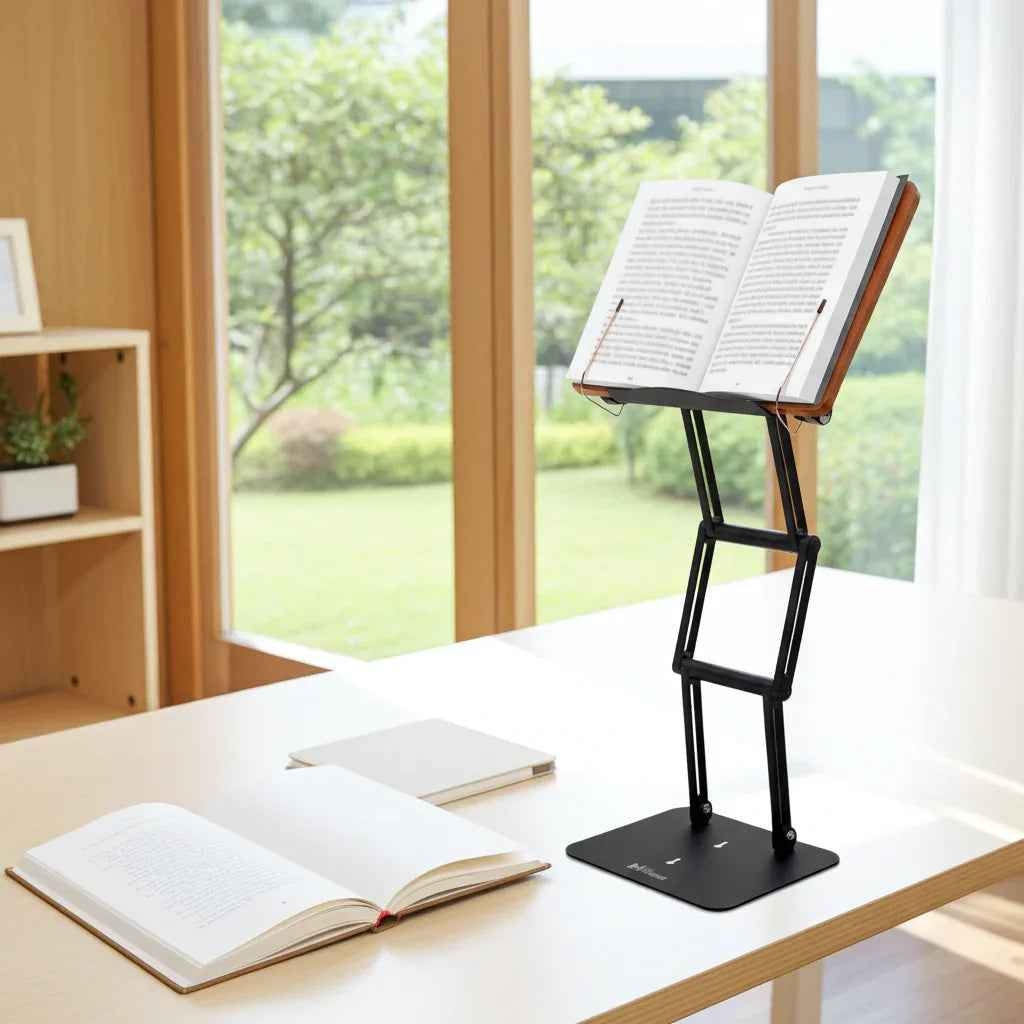
A few hours into serious study, most people assume the problem is mental fatigue. Often, it starts lower - with the neck drifting forward, the shoulders rounding, and the textbook pulling your gaze down toward the desk. If you want to know how to position textbooks for long study sessions, the goal is simple: bring the book to your eyes instead of forcing your body to collapse toward the page.
That sounds minor until you feel the cumulative effect. Extended reading from a flat surface can load the cervical spine, tighten the upper back, and make concentration harder than it needs to be. Good textbook positioning is not about making a desk look organized. It is about preserving posture, reducing strain, and creating a study setup that remains usable after the first 30 minutes.
Why textbook position matters more than most students realize
When a heavy textbook sits flat on a desk, your body tends to adapt in the wrong direction. The head moves forward, the chin drops, and the upper spine follows. This posture may feel manageable for a short review session, but it becomes expensive during a three-hour block of reading, note-taking, and problem solving.
The issue is not only discomfort. A poor viewing angle increases physical effort, which quietly competes with cognitive effort. If your neck, shoulders, and eyes are working harder to maintain the task, your attention has less room for the task itself. For students, researchers, and scholars who spend long periods with dense material, that trade-off matters.
A properly positioned textbook supports a more upright head and torso, keeps the page within a natural visual field, and reduces the urge to hunch. That is the ergonomic foundation for longer, more focused sessions.
How to position textbooks for long study sessions
The most effective position places the textbook elevated and angled toward your line of sight rather than flat against the desk. For most people, the book should sit high enough that you can read with your head relatively neutral, not bent sharply downward. The exact height depends on your chair, desk, body proportions, and whether you are also writing.
As a starting point, place the top third to half of the page closer to eye level. The book should be tilted enough to reduce neck flexion but not so vertical that glare, page movement, or visual distortion becomes a problem. In many study setups, an angle in the moderate range feels best because it balances visibility with stability.
Distance matters too. If the book is too close, you crowd your visual space and may round forward anyway. If it is too far, you lean in to recover detail. A comfortable reading distance usually allows you to see the full page clearly while keeping your elbows relaxed and your shoulders down.
The simplest test is physical, not theoretical. Sit back in your chair with both feet supported. If you can read several paragraphs without your chin gradually dropping toward your chest, the position is probably close. If you keep creeping forward, the book is too low, too flat, or too far away.
The best angle for reading versus writing
This is where many setups fail. Reading and writing do not demand the same position.
If you are primarily reading, you can place the textbook higher and more upright. That reduces neck strain and keeps the text in a stronger visual zone. If you are switching constantly between reading and handwriting, the angle usually needs to come down slightly so your hand can move comfortably across a notebook or so you can reference both surfaces without excessive eye travel.
For problem sets, legal reading, language study, and any workflow that alternates between source material and active note-taking, a split setup works best. Keep the textbook elevated at a readable angle and place your notebook or keyboard lower. This preserves posture while still allowing practical desk work.
Heavy textbooks need real stability
A flimsy stand creates its own problem. If the platform wobbles, sags, or shifts under the weight of a dense academic text, you will keep adjusting it or abandon it. For long sessions, stability is not a luxury feature. It determines whether the posture benefit actually holds.
Large textbooks, reference volumes, and religious study texts require a stand with enough structural strength to support the load without bounce at the joints. A premium platform makes a difference here because the angle stays where you set it, the page remains visible, and your study rhythm does not get interrupted by hardware limitations.
That is one reason serious readers tend to outgrow lightweight stands designed mainly for tablets. A true study tool has to support real books, at real height, for real work.
Desk setup matters as much as the book itself
Even the best textbook angle cannot compensate for a poor overall workstation. Your chair height should allow your feet to rest securely and your knees to sit at a comfortable bend. Your shoulders should remain relaxed rather than lifted toward the ears. If your desk is too high, you may still develop tension even with the book elevated.
Lighting also changes textbook position. If light creates glare on glossy pages, you may instinctively lower the book or twist your body to avoid reflection. It is better to adjust the lamp or room light first, then keep the book in the ergonomically correct zone.
If you use a laptop alongside a textbook, avoid stacking one compromise on top of another. Many people place the textbook flat beside a raised screen, then spend hours turning and dropping the head between both surfaces. A better arrangement keeps both the book and screen elevated as close as practical within your visual field. Less vertical and rotational travel usually means less strain over time.
Common mistakes when positioning textbooks
The most common mistake is assuming flat equals normal. It is common, but not ideal for prolonged study. Flat reading encourages sustained neck flexion, especially with large books and fine print.
Another mistake is raising the book slightly but leaving it too low to matter. A minimal lift may look ergonomic without delivering meaningful change. If your neck angle is still pronounced, the setup is cosmetic rather than corrective.
There is also the opposite error: setting the book too high or too upright for the task. That can force the wrists or shoulders into awkward positions, especially if you need to write at the same time. Good ergonomics is not about maximizing height at all costs. It is about matching height and angle to the work.
Finally, many students ignore session length. A position that feels acceptable for 20 minutes may become punishing after two hours. Evaluate your setup based on realistic study duration, not a quick trial.
A better long-session workflow
For long study blocks, think in phases. Set the textbook at an elevated, stable angle for concentrated reading. Keep your notes directly below or slightly to the side, depending on whether you are right- or left-handed. When you shift into heavier writing, lower the visual demand by bringing the source closer to eye level rather than dragging your body down toward the desk.
This is where an adjustable stand earns its place. A fixed platform can help, but serious study often changes form across the hour. You might begin by reading a chapter, move into annotation, switch to a laptop, then return to the text. A stable adjustable stand supports those transitions without forcing a full workspace reset.
For students and professionals who work with substantial books, The Stander 1.1 addresses the core problem directly: it lifts heavy reading material to a strong ergonomic position and holds it there with the kind of stability that long sessions demand. That matters when the goal is not occasional convenience, but sustained performance.
How to know your textbook is positioned correctly
You should be able to study with a tall but relaxed posture. Your head stays more stacked over your torso than projected forward. Your eyes move across the page without needing constant neck adjustment. After 45 to 60 minutes, you may feel normal mental fatigue, but not the familiar ache that starts at the base of the neck and creeps into the shoulders.
The right setup also feels quieter. You stop fidgeting with the book, stop propping it with random objects, and stop rebuilding your workspace every hour. Ergonomics, when done well, removes friction.
Long study sessions will always demand effort. The point is to spend that effort on comprehension, memory, and analysis - not on holding your body in a compromised position just to see the page. Raise the text, support the posture, and let the setup carry more of the load.