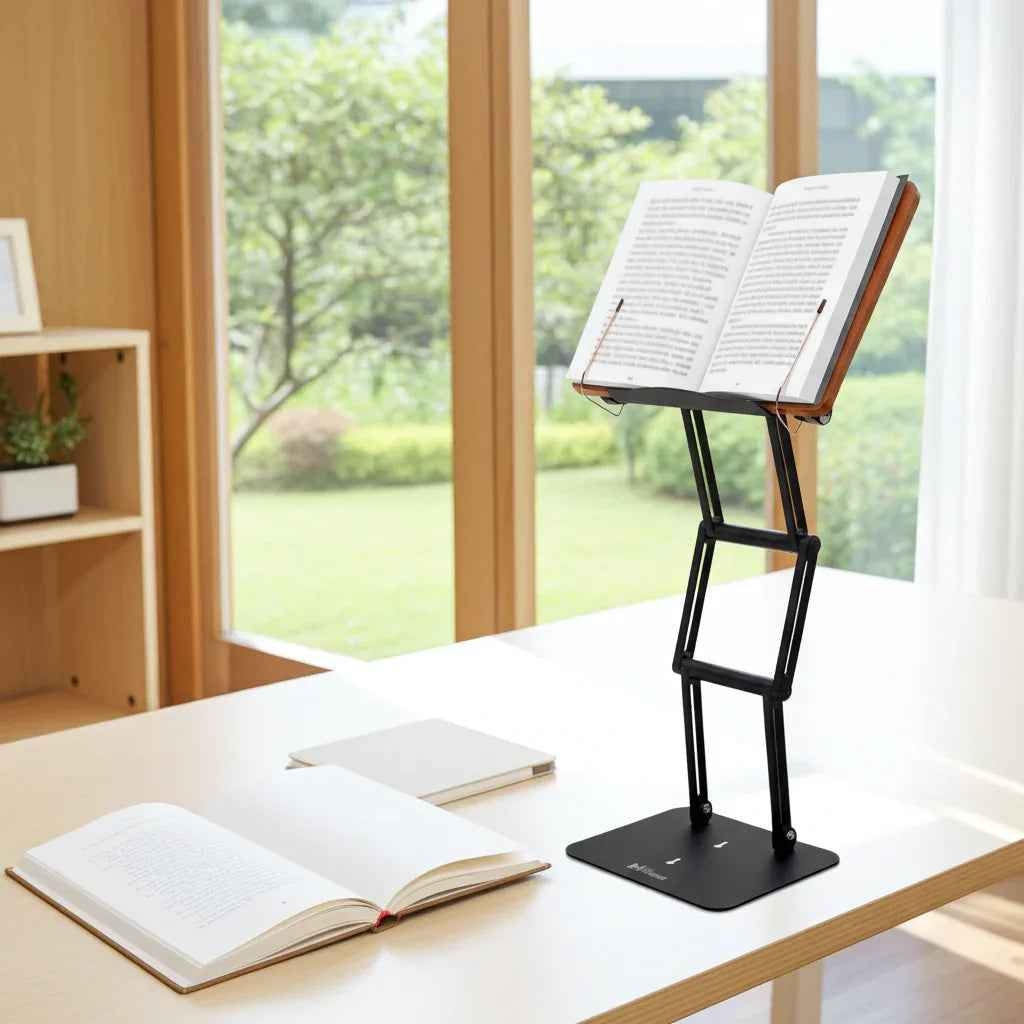
A laptop that sits flat on a desk asks your body to do something unnatural for hours at a time: drop the head, round the shoulders, and stare downward. If you are trying to figure out how to set your laptop at eye level, the goal is not to create a picture-perfect desk. The goal is to reduce cervical strain, keep your posture more neutral, and make long reading or work sessions sustainable.
This matters more than most people realize. The head is heavy, and every inch it drifts forward increases the load on the neck and upper back. Over time, a low laptop setup can turn focused work into fatigue, tension headaches, shoulder tightness, and the familiar urge to constantly shift, stretch, or quit early.
Why laptop height matters more than people think
A laptop is convenient because it combines your screen and keyboard in one unit. Ergonomically, however, that is also the problem. The screen should be high enough to keep your gaze near eye level, while the keyboard should be low enough for relaxed shoulders and neutral wrists. A laptop cannot do both on its own.
That is why so many people feel stuck between two bad options. If your leave the laptop on your desk, your neck pays the price. But if you raise the laptop without changing anything else and your elbows lift, wrists extend, and shoulders start working overtime. A proper setup solves that conflict by separating screen height from typing position.
For most desk-based work, the best target is simple: the top of the screen should be at or slightly below eye level, and the center of the screen should sit a bit below your natural line of sight. Your eyes should look slightly downward, not sharply down. That small adjustment often makes an immediate difference.
How to set laptop eye level for real work
Start with your seated posture, not the laptop. Sit back so your body is supported rather than hovering forward. Let your feet rest flat on the floor or on a footrest, and keep your knees and hips in a comfortable position. Then relax your shoulders and look straight ahead. That line of sight is your reference point.
Now raise the laptop until the top edge of the screen is roughly level with your eyes. For some people, slightly below eye level feels better, especially if they wear progressive lenses or do close reading for long periods. The right answer is the one that lets your neck stay neutral rather than bent forward.
Distance matters too. If the screen is too close, you tend to crane back or tense your eyes. If it is too far, you lean in. A practical starting point is about an arm's length away, then adjust based on screen size and your visual comfort. Larger screens can usually sit a bit farther back.
The final step is the one people skip: if the laptop is elevated, use an external keyboard and mouse. That is what turns a raised screen into a complete ergonomic setup instead of a partial fix.
A quick self-check
You do not need a measuring tape to know whether your laptop is at the right height. If you can read the screen while keeping your ears roughly over your shoulders, you are close. If your chin drifts forward, your upper back rounds, or your eyes constantly angle downward, the screen is still too low.
Another useful check is session length. A setup might feel fine for ten minutes and fail after ninety. If you notice neck stiffness, upper trap tension, or a need to constantly drop one shoulder while typing, there is still a mismatch somewhere in height, distance, or input position.
The most common mistakes when setting laptop eye level
The first mistake is stacking books under the laptop and stopping there. That can improve screen height, but it usually leaves the keyboard too high to type comfortably. It is an incomplete solution unless you add separate input devices.
The second mistake is chasing eye level while ignoring stability. A wobbly stand may technically raise the screen, but if it shifts while you type, read, or tap the trackpad, your body compensates with tension. Serious desk work needs a platform that stays put.
The third mistake is treating every task the same. Writing emails, reviewing spreadsheets, reading dense academic texts, and watching a presentation each place different demands on your eyes and posture. Some users need a slightly lower screen for typing-heavy work and a slightly higher position for long reading sessions. That is normal.
A final mistake is forgetting documents. If your laptop is elevated but your notes, textbook, or printed material remain flat on the desk, your head still keeps dropping. For students, legal professionals, researchers, and religious scholars, that matters. Screen ergonomics alone do not solve a reading posture problem.
What to use to raise a laptop to eye level
You can improvise with household objects, and in the short term that is better than doing nothing. But makeshift stacks tend to slip, limit adjustability, clutter the desk, and fail under heavier devices or long-term use. For occasional work, that may be acceptable. For daily study or professional output, it rarely is.
A proper stand should do three things well: reach the height you actually need, stay stable under load, and allow quick adjustment as tasks change. This is where premium construction makes a real difference. A lightweight stand that flexes under pressure can be frustrating even if the dimensions look good on paper.
For users who alternate between laptops, textbooks, tablets, sheet music, or large-format reading material, versatility matters just as much as height. A serious stand should support more than one workflow. That is one reason the modern raised study platform remains so effective. The old idea behind a shtender was not aesthetic. It was practical: bring the material up to the eyes so the body can stay composed for extended concentration.
A well-built stand like The Stander 1.1 fits naturally into that tradition while serving modern desk work. It raises a laptop to a functional viewing height, supports substantial reading material, and offers the kind of stability that serious users notice immediately.
How to set laptop eye level if you work in different positions
Not everyone works in a fixed seated posture all day. Some people shift between seated and moderate standing sessions, and others move from focused writing to reading-heavy work. Your laptop height should follow the task, not lock you into one rigid position.
If you are seated, prioritize a neutral neck and relaxed shoulders. If you are standing, the same rule applies, but desk height becomes more critical. Many standing setups fail because the screen gets raised while the keyboard remains too high, forcing the shoulders upward. In those cases, a laptop riser helps the screen, but you still need the rest of the workstation to match.
If your day includes a lot of reading, you may benefit from setting the material slightly higher than you would for general typing. That reduces the repeated downward gaze that accumulates over hours. For detailed writing or keyboard-intensive work, it can be worth lowering the visual target slightly if that keeps the arms and wrists more comfortable. Ergonomics is precise, but it is not rigid.
What if you cannot use an external keyboard?
Sometimes you are traveling, working in a classroom, or moving between rooms. In that case, you may not be able to build a perfect setup. Do the best available version. Raise the laptop partway rather than all the way if you still need to type on it. Take more frequent breaks. Switch tasks when possible so you are not locked into one posture for too long.
This is where trade-offs matter. A partially raised laptop can still reduce some neck flexion, even if it does not solve the keyboard issue completely. It is not ideal, but it is often better than leaving the device completely flat for hours.
How to know your setup is working
The right setup usually feels less dramatic than people expect. You do not suddenly feel engineered. You simply stop fighting your desk. Your gaze lands naturally on the screen, your shoulders settle, and your neck is not carrying the entire burden of your workday.
Performance improves too. When your posture is more neutral and your setup is stable, reading gets easier, writing sessions last longer, and your attention stays on the task rather than your discomfort. That is the real standard. Ergonomics is not about chasing a trend. It is about building a workspace that supports serious thinking.
If you are deciding how to set laptop eye level, think beyond screen height alone. Look at the full chain: posture, distance, keyboard position, reading material, and stability. Small adjustments can help. The right equipment helps more. When your tools meet the demands of real work, your body notices first.