Three hours into a study session, most people assume the problem is stamina. It usually is not. If your neck is tight, your shoulders are creeping upward, and you keep dropping your chin toward a textbook or laptop, your setup is draining you before your brain does. Learning how to study longer without neck pain starts with one simple principle: stop forcing your cervical spine to support a downward-looking position for hours at a time.
Neck pain during study is rarely caused by studying itself. It is caused by sustained posture, poor screen or book height, and small habits that compound over time. The good news is that you do not need a perfect workstation or an expensive office remodel to fix it. You need a more intelligent relationship between your eyes, your hands, and the material in front of you. There are, after all, reading aids for neck problems that, when used correctly, can help you prevent the problem from arising or correct it if it has already developed.
Why studying causes neck pain faster than you think
When you study from a flat desk, your head naturally tilts forward. That position increases the demand on the muscles of the neck and upper back. The farther your head moves in front of your torso, the harder those muscles must work to keep you upright. For a short period, that may feel manageable. Over a long session, it becomes fatigue, stiffness, and eventually pain. People refer to this as either "tech-neck" or "readers neck".
Textbooks make this worse because they are heavy, low, and wide. Laptops create a similar problem because the screen and keyboard are attached, so using one often means compromising the other. Tablets and notebooks are not much better if they sit flat on the desk. The common denominator is visual angle. If the material you are reading sits too low, your body pays for it.
There is also a concentration cost. Once your neck starts to tighten, attention drops. You reread paragraphs, shift around constantly, and lose study momentum. Better ergonomics are not only about comfort. They are part of cognitive performance.
So, what is the best reading position for neck pain? (I mean, of course, how to prevent it. If you want the neck pain, just keep doing what you've been doing so far...) How can I prevent neck pain before it becomes an issue?
How to study longer without neck pain: fix height first
If you change only one thing, change the height of what you are looking at. Reading material should sit as close to eye level as your task allows. That reduces neck flexion and keeps your head more centered over your spine.
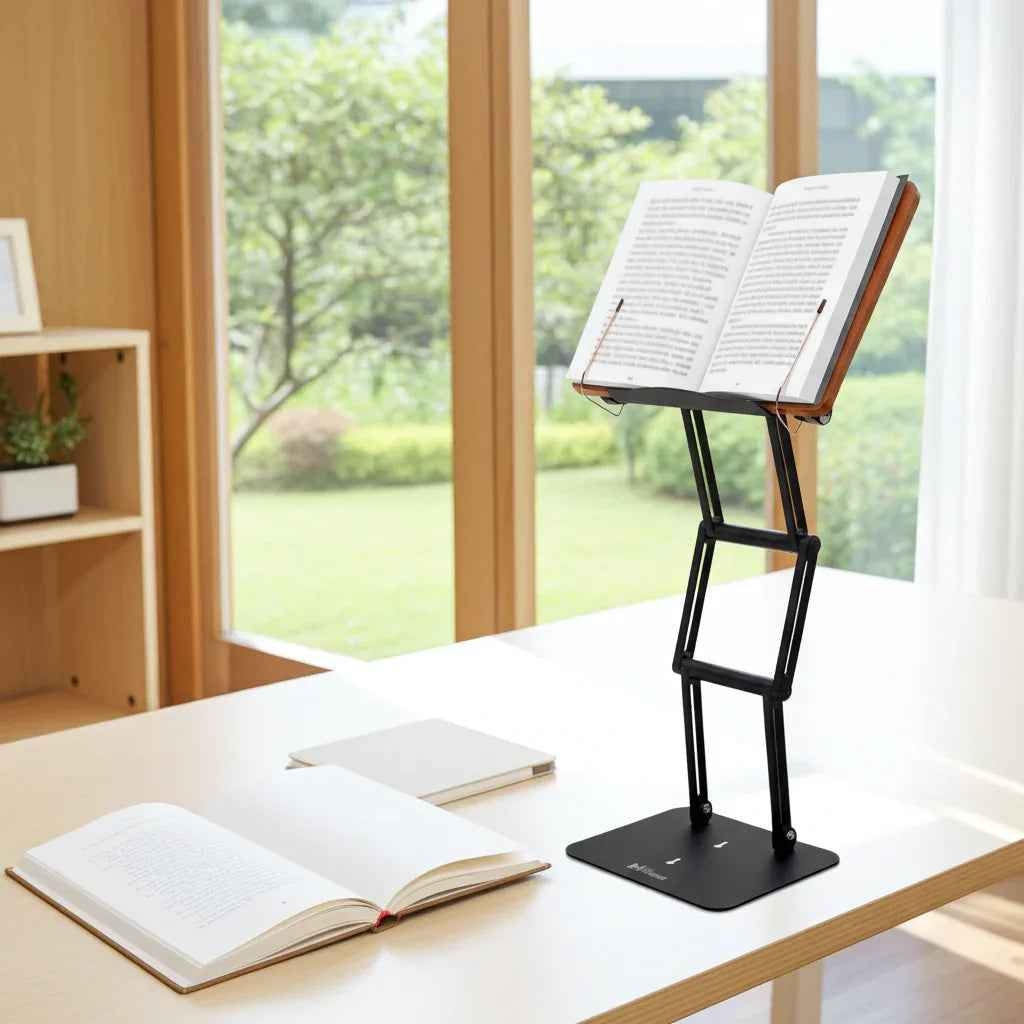
For books, printed notes, and tablets, a raised stand is usually the cleanest solution. It brings the page up instead of forcing you down toward it. This matters even more if you work with heavy textbooks, legal materials, binders, or religious texts that are difficult to prop up safely on improvised supports.
For laptop use, the trade-off is straightforward. If the laptop is low, your neck suffers. If you raise it, your hands may need a separate keyboard and mouse for longer sessions. That is worth it if you spend hours reading, outlining, or writing. The more time you spend at a desk, the less sense it makes to accept a compromised angle.
A stable elevated platform is not a luxury for serious study. It is infrastructure. Flimsy stands shake, sag, or fail under real weight, which defeats the purpose. If your materials are substantial, your support should be substantial too.
Your chair and desk still matter, but not in the way people think
People often obsess over the chair first. A good chair helps, but chair quality will not solve a low reading angle. Start with the visual target, then adjust the rest around it.
Your elbows should rest comfortably with your shoulders relaxed. Your forearms should not be reaching upward to type, and your wrists should not collapse downward. Your feet should feel supported on the floor or a footrest. Once those basics are in place, the neck usually improves because the rest of the body is no longer compensating.
Seat height is especially important. If the chair is too low, your whole body tends to hunch. If it is too high, you may tense your shoulders or perch awkwardly. Aim for a position where your ribcage stays stacked over your pelvis instead of slumping backward while your head juts forward.
That said, ergonomics is not one-size-fits-all. A law student reviewing casebooks, a graduate researcher annotating journal articles, and a yeshiva student learning from sacred texts may all need slightly different angles and hand positions. The principle stays the same: reduce the distance between good posture and the work itself.
Movement is not a break from studying. It is part of studying.
Even an excellent setup cannot make the body static for four hours without consequence. If you want to study longer without neck pain, build movement into the session before discomfort forces it.
A practical rhythm is 25 to 45 minutes of focused work followed by one to three minutes of reset. That reset does not need to be dramatic. Stand up. Roll the shoulders. Gently bring the chin back over the chest instead of poking it forward. Let the arms hang. Look across the room or out a window to relax the constant close-focus demand on your eyes.
Longer breaks matter too. After about 90 minutes, step away for five to ten minutes. Your neck muscles recover faster from small interruptions than from one large crash at the end of the day.
This is where many disciplined students get it wrong. They treat discomfort as proof of commitment. It is usually proof that the setup is inefficient. Serious work benefits from structure, not needless strain.
The study habits that quietly irritate your neck
A few common habits create more neck stress than people realize. One is reading in bed or on a couch with the head pushed forward. Another is writing notes while constantly glancing down and back up between a flat notebook and a low screen. The repeated change in angle adds up.
Phone use is another issue. If you study from PDFs, flashcards, or articles on your phone while looking down into your lap, you are training the exact posture you are trying to avoid. For quick reference, that may be fine. For sustained study, it is a poor tool.
Multitasking can also worsen strain. When your textbook is flat, your laptop is off to the side, and your notes are piled below, your neck keeps rotating and dipping. A more centered setup reduces unnecessary motion and preserves attention.
Lighting deserves more respect too. If the page is dim, you lean closer. If there is glare on the screen, you crane to avoid it. Good light supports neutral posture because it lets you see clearly from where you should be sitting.
How to study longer without neck pain when using books and laptops
The hardest study setups are mixed-use ones. You are reading from a textbook, typing on a laptop, checking a reference on a tablet, and writing occasional notes by hand. This is exactly where many desk setups fall apart.
In these cases, prioritize the item you use most continuously. If most of your time is spent reading, elevate the book first. If you are drafting or coding, prioritize the screen. If your work switches constantly, use a setup that lets you reposition materials quickly without rebuilding your desk every hour.
This is why serious students and professionals benefit from a platform designed for actual load-bearing use, not just casual tablet display. A premium adjustable stand like The Stander 1.1 can support heavier materials at a useful viewing height and maintain stability through long sessions. That combination matters more than people expect. When the platform is stable, your hands relax, your visual angle improves, and your attention stays on the page instead of on managing the equipment.
The point is not to buy more gear for its own sake. The point is to remove physical friction that shortens useful study time.
When neck pain means more than poor setup
Most study-related neck discomfort improves with better posture, support, and movement. But sometimes the issue is more than ergonomic fatigue. If pain shoots into the arm, causes numbness, triggers headaches regularly, or persists even when you are not studying, it may be time to consult a medical professional.
The same is true if you cannot find any position that feels sustainable. Ergonomics can reduce mechanical stress, but it does not replace evaluation for an underlying problem. There is no benefit in pushing through symptoms that are escalating.
For everyone else, the message is encouraging. Small corrections work. Raise the material. Bring the work closer. Support the arms. Take brief movement breaks before discomfort builds. Use tools that match the seriousness of the task.
Studying longer should come from better focus and better structure, not from tolerating avoidable pain. If your neck feels like the weak link in your study routine, the answer is usually not more endurance. It is a setup worthy of the work you are trying to do.