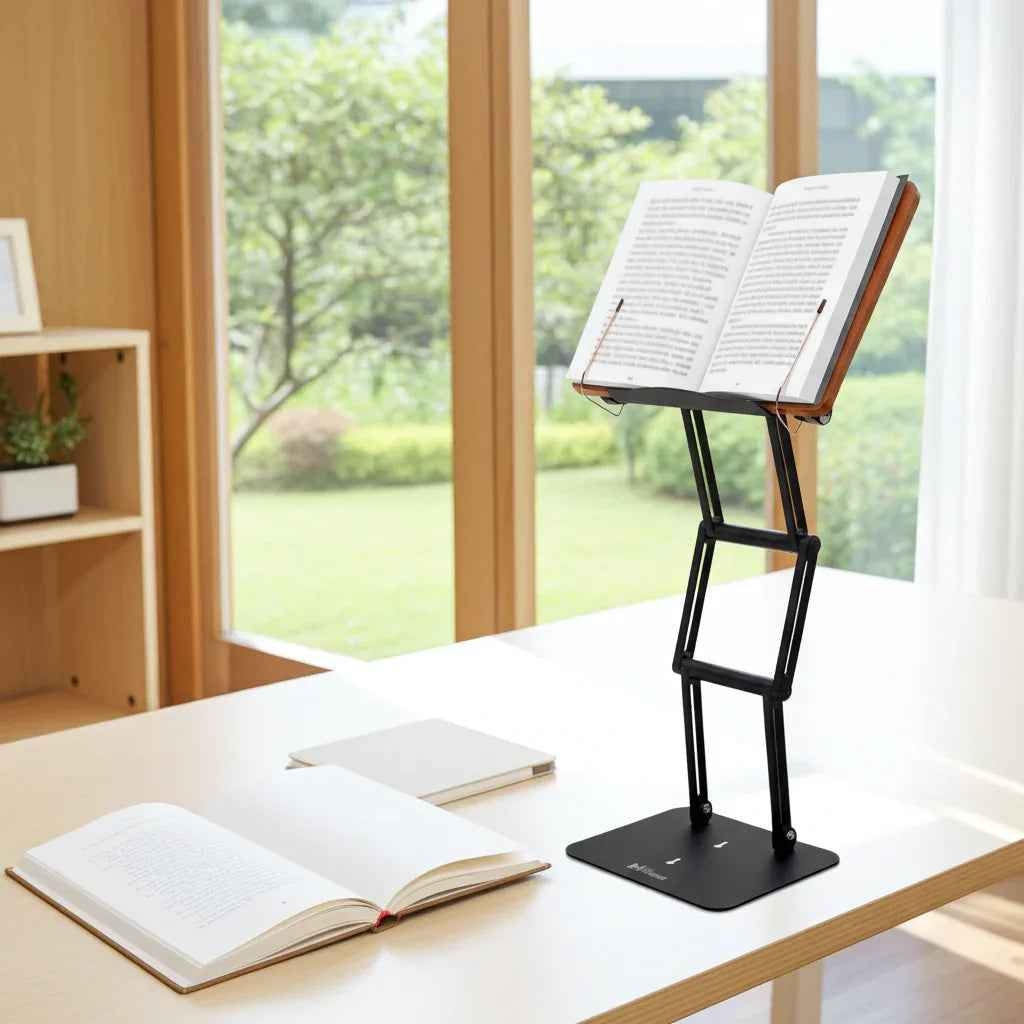
If your neck starts aching halfway through a study session, the problem is often not the book. It is the height. When people ask what height should a book stand be, the real answer is this: high enough to reduce neck flexion, low enough to keep your shoulders relaxed, and adjustable enough to match the task in front of you.
That sounds simple, but small differences in height change everything. A stand that sits too low pulls your head forward and rounds your upper back. A stand that sits too high forces your chin up and can create tension through the neck and shoulders. The right height supports visual comfort, upright posture, and longer periods of focused reading without the usual physical cost.
What height should a book stand be for good posture?
For most seated desk work, a book stand should position the top third to middle of the page close to eye level. That usually places the reading surface above the desk by several inches, but there is no single universal measurement because desk height, chair height, torso length, and the size of the book all matter.
A practical ergonomic target is to keep your gaze angled slightly downward, not sharply down. In most cases, that means your eyes should meet the page with about 10 to 20 degrees of downward gaze. This is a much smaller angle than looking down at a flat textbook on a desk, which often pushes the neck into sustained flexion.
If you are reading a large textbook, legal volume, or religious text, the stand often needs more elevation than people expect. Heavy books are thicker, taller, and harder to position well on basic stands. If the platform cannot rise high enough, you end up compensating with your spine. That defeats the whole purpose of using a stand.
The simplest way to set book stand height
Start in your normal working posture, not your corrected posture. Sit all the way back in your chair with your feet planted and shoulders relaxed. Then place the book stand directly in front of you, centered with your body rather than off to one side.
Raise the stand until you can read the upper half of the page without bending your neck forward. From there, fine-tune. If your chin is lifting, bring it down slightly. If your eyes still drop sharply toward the page, raise it more.
A good test is whether you can read for ten minutes while keeping your ears roughly aligned over your shoulders. If your head starts drifting forward, the stand is probably too low or too far away.
Distance matters almost as much as height. A stand that is high but placed too far back on the desk can still make you lean forward. For most users, the page should be close enough that you can read comfortably without jutting your head toward it.
Why the ideal height depends on how you read
Not every reading task needs the exact same setup. Casual reading, note-heavy study, copying from a source text, and alternating between a book and a laptop all place different visual and postural demands on the body.
If you are reading continuously from one book, a higher position is usually better because your eyes stay on the text longer and the body benefits from reduced neck flexion. If you are switching between the stand and handwritten notes on the desk, you may want the book slightly lower so the visual transition is less extreme.
For musicians reading sheet music, the stand often needs to sit even higher to preserve a neutral head position while playing. For kitchen use, such as a cookbook holder, ideal height is less about eye level and more about visibility without hunching over a counter. For a laptop used on a stand, the correct height changes again because the screen should be near eye level, but the keyboard cannot stay at that height unless you are using an external keyboard and mouse.
This is where fixed stands start to show their limits. Serious users need adjustment range, not just the ability to tilt a tray.
Seated desk height vs standing height
When used at a seated desk, the stand should generally elevate the reading material so your head remains upright and your elbows stay relaxed at your sides if you are interacting with the page. The stand should not force your shoulders upward or make page turning awkward.
For moderate standing work, the reading surface usually needs to be much higher than people assume. A platform that felt adequate on a desk may become far too low when you stand. If you plan to alternate between sitting and standing, you need a stand with enough vertical travel to preserve nearly the same visual relationship in both positions.
That is especially relevant for users who study for long blocks of time and shift positions to stay comfortable and alert. A low-capability stand may work for a tablet on a table, but not for a large text in a real reading workflow.
Signs your book stand is too low or too high
A poorly set stand usually reveals itself quickly. If it is too low, you may notice forward head posture, upper back rounding, tension between the shoulder blades, and the urge to prop your chin down toward the page. Over time, that position increases strain on the cervical spine and makes sustained reading feel more fatiguing than it should.
If the stand is too high, the warning signs are different. You may lift your chin, tighten the front of the neck, feel shoulder tension, or experience visual discomfort because your eyes are working at an awkward angle.
The sweet spot feels almost unremarkable. Your neck does not have to work very hard. Your eyes can scan the page naturally. Your breathing stays easy. You stop thinking about your posture every few minutes because the setup is doing more of the work for you.
What height should a book stand be for students and professionals?
For students, researchers, attorneys, clinicians, and other heavy readers, the right height is usually the maximum height that still allows a slight downward gaze and comfortable page access. In practice, that often means choosing a stand with more elevation capacity than you think you need.
Why? Because serious reading rarely stays static. One day it is a paperback. The next day it is a 1,200-page textbook, a reference binder, or a dual-use setup where the stand holds reading material in front of a monitor. If the stand only works at one modest height, it will not scale with the real demands of academic or professional work.
That is why premium ergonomic stands are built differently from lightweight consumer models. Stability matters at height. Joint quality matters at height. Load capacity matters at height. A stand that wobbles under a heavy book encourages constant micro-adjustments, and those interruptions are not just annoying. They break concentration.
For users who need a serious reading platform, a high-adjustability design like The Stander 1.1 makes sense because it supports eye-level placement, heavier materials, and a broader range of workflows than typical low-profile stands.
The angle of the platform matters too
Height alone will not fix posture if the book lies at the wrong angle. The platform should usually be tilted enough to present the page toward your eyes without excessive glare or awkward wrist reach during page turns.
A flatter angle can work for writing in a workbook or marking up a document. A steeper angle is often better for continuous reading because it brings the text into a more direct line of sight. The trade-off is access. As the platform gets steeper, page handling can become slightly less convenient unless the stand is well designed.
The best setup balances three things at once: height, tilt, and distance. If one is off, the others often have to compensate.
Improve Your Setup
If you're looking to elevate your law books, tablets, or laptops to a more comfortable reading position, an adjustable stand can make a significant difference.
A quick rule of thumb before you buy
If you are trying to choose a stand and want one rule that prevents most mistakes, use this: buy for your heaviest and longest reading sessions, not your lightest use case.
A stand that can hold a large textbook steadily at near eye level will usually handle a paperback, tablet, cookbook, or sheet music just fine. The reverse is rarely true. Many stands look acceptable in product photos but fail when asked to support real academic or professional work for hours at a time.
That is the difference between a convenience accessory and a true ergonomic tool. One holds a book. The other helps preserve posture, reduce neck strain, and support serious concentration.
If your reading setup is part of how you study, work, pray, write, or think, the right height is not a minor detail. It is the foundation of whether the stand actually serves you. Aim for a position that brings the page up to you, rather than forcing your body down to the page.