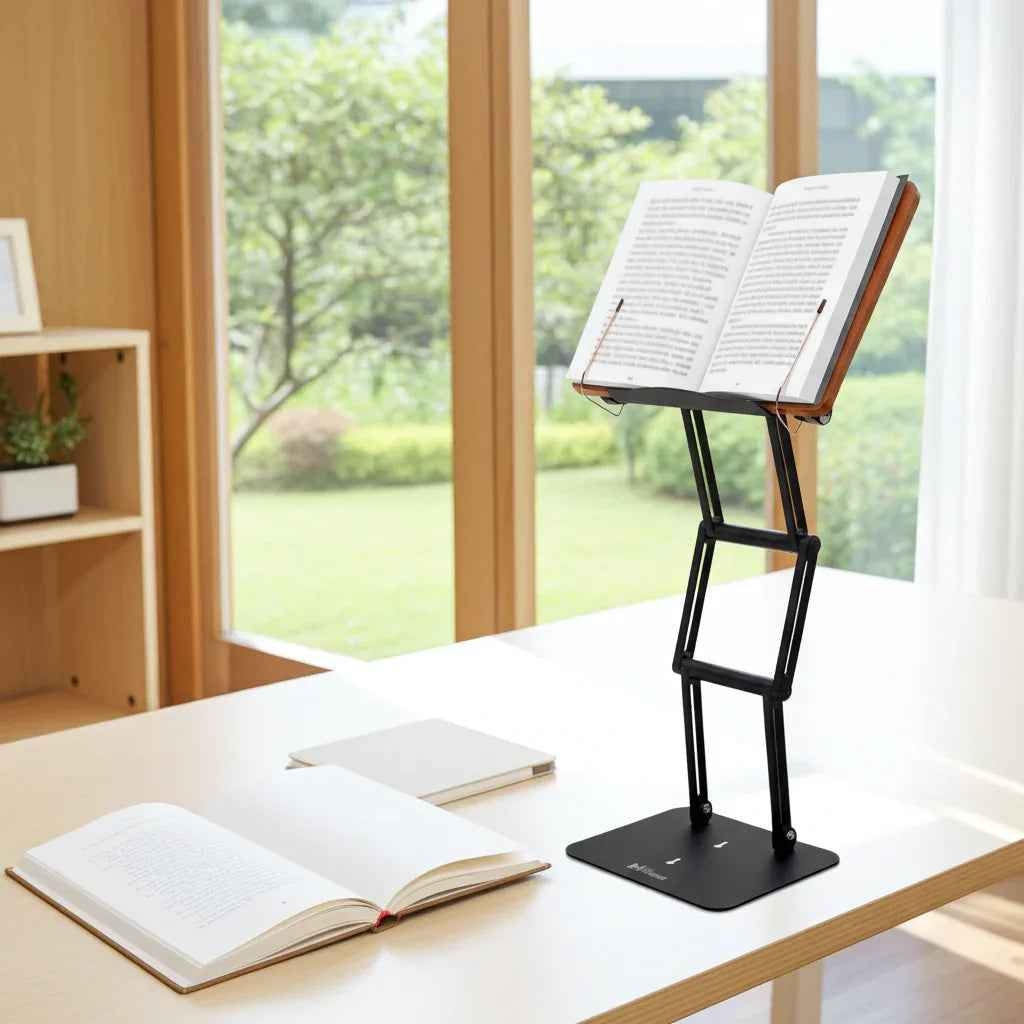
A student hunched over a laptop for three hours does not have a motivation problem. More often, they have a setup problem. The best posture aids for students do not force perfect posture every second. They reduce the physical friction that makes slouching the default.
That distinction matters. Students read dense textbooks, annotate printed pages, type on low laptops, and shift between desk work and bed study more than they should. Telling them to just sit up straight is not ergonomic advice. It is wishful thinking. Good posture support starts by changing the study environment so the neck, shoulders, and lower back are not constantly fighting the furniture.
What makes the best posture aids for students actually work
A posture aid is only useful if it solves the reason posture breaks down. For students, that usually means one of three things: the reading material is too low, the chair and desk do not fit the body, or the setup cannot stay comfortable long enough for focused work.
The most effective tools improve alignment without demanding constant self-correction. They bring books and screens closer to eye level, support the feet and pelvis, and reduce the strain that builds when study sessions run long. The weak options are the ones that look ergonomic in a product photo but wobble under a heavy textbook, slide around on the desk, or create one new strain while fixing another.
That is why posture aids should be judged by function, not trend. Stability matters. Adjustability matters. So does whether the tool fits the way students actually work, which is often a mix of textbooks, tablets, notebooks, and laptops all competing for the same desk space.
1. An adjustable book stand or study stand
If a student spends serious time reading, this is often the highest-impact upgrade. A quality stand elevates textbooks, notebooks, and tablets so the head stays more upright instead of dropping forward for hours at a time. That one change can reduce cervical flexion, ease upper trap tension, and make long reading sessions more sustainable.
The trade-off is simple. Not every stand deserves desk space. Lightweight models made for thin tablets often fail when asked to support heavy textbooks or large academic volumes. Students who work with demanding reading loads need a stand with real elevation range, stable joints, and enough strength to hold weight without collapsing or bouncing.
For that reason, the best posture aid is often not a wearable corrector at all. It is a properly engineered study platform. A premium adjustable stand, such as Dr. Shtaygen's modern shtender-style design, makes particular sense for students who alternate between textbooks, printed research, and laptop work and need one serious tool rather than several flimsy ones.
2. A laptop riser with an external keyboard
Students love working directly from a laptop because it is simple and portable. Ergonomically, it is a compromise. When the screen is low enough for the hands to type comfortably, the neck usually bends down. When the laptop is raised high enough for the screen, the arms and wrists are no longer in a good typing position.
That is why a laptop riser works best when paired with an external keyboard and mouse. The screen comes up toward eye level while the hands stay lower and more neutral. For students writing papers, reviewing lecture slides, or attending long virtual classes, this setup is often much better than trying to make a bare laptop do everything.
The downside is cost and complexity. It adds accessories to the desk and makes a grab-and-go workflow less convenient. But for anyone spending multiple hours a day at a computer, the posture benefit is usually worth it.
3. A footrest for unsupported legs
A footrest does not get much attention, but it can quietly fix a major problem. Many students use desks and chairs that were not built for their proportions. If the seat is too high and the feet do not rest flat on the floor, the body starts searching for stability. That often leads to sliding forward, rounding the back, or wrapping the feet around chair legs.
A footrest gives the lower body a stable base. That helps the pelvis sit more neutrally and can reduce strain traveling up the kinetic chain into the lower back. It is especially useful for shorter students, students in dorms with nonadjustable furniture, and anyone using a chair that fits poorly.
This is not a cure-all. A footrest cannot rescue a truly bad chair. But when the problem is dangling feet and poor lower-body support, it does a lot for a relatively small change.
4. A supportive seat cushion or lumbar support
Students often assume back pain starts in the back. In practice, the pelvis and seat surface play a major role. If the chair encourages posterior pelvic tilt, the spine tends to collapse into a rounded posture. A supportive seat cushion or lumbar support can help maintain a better base position, especially during long study blocks.
Seat cushions are useful when the chair is too hard, too flat, or already sagging. Lumbar supports are helpful when the chair back does not meet the lower spine where support is needed. The best choice depends on the chair itself. Some students need both, but many only need one.
The caution here is overcorrection. Extremely aggressive lumbar devices can feel supportive for ten minutes and irritating after an hour. The goal is not to force the spine into an exaggerated shape. It is to support a sustainable position that reduces fatigue.
5. A document holder for note-heavy study
Students in law, medicine, graduate research, and technical fields often work from multiple sources at once. One page is on the desk, another is on the screen, and handwritten notes are off to the side. That constant twisting and looking down can create more strain than people realize.
A document holder keeps papers elevated and closer to the visual field. It is a simple tool, but it helps reduce repeated neck flexion and awkward rotation. For students who annotate printed readings or transcribe from paper to screen, it can improve both comfort and efficiency.
This matters more than it seems. Small repetitive postural stress adds up over a semester. If a student spends four hours a day looking down at printed material, the low-tech fix is often the right one.
6. A monitor arm or external monitor for fixed workstations
Students with a dedicated desk setup should think beyond portable accessories. If most work happens in one place, an external monitor on a proper arm can transform posture. The screen can be placed at a height and distance that reduces neck strain and helps maintain a more upright head position.
This is especially valuable for graduate students, researchers, and anyone doing split-screen work with large documents or data. A larger monitor also reduces the urge to lean forward and squint at a small laptop display.
Of course, this only makes sense for a stable workstation. For dorm life or frequent travel, it may be impractical. But for serious desk-based study, it is one of the more effective long-session solutions.
7. Posture wearables and braces - useful, but limited
Many students search for wearable posture correctors first because they promise a quick fix. That appeal is understandable. Some wearables can provide a useful reminder when the shoulders round or the upper back collapses.
Still, these are rarely the best primary solution. If the desk is too low and the screen is in the wrong place, a brace does not remove the cause of the problem. It may even become irritating if it tries to pull the body into position while the workstation keeps dragging it out again.
Wearables are best treated as temporary training tools, not the foundation of an ergonomic setup. For occasional awareness, they can help. For heavy academic use, environmental changes usually deliver better results.
How students should choose the right posture aid
The best posture aids for students depend on what kind of strain shows up first. If the neck hurts after reading, raise the reading material. If the lower back aches after an hour, look at foot support, seat support, and chair height. If typing causes slouching, fix the screen and keyboard relationship.
It also depends on study style. A pre-med student moving through thick textbooks has different needs than an undergrad watching lectures on a laptop. A seminary student or religious scholar working from large sacred texts may need exceptional load-bearing stability and a steeper, more traditional reading angle. A graduate researcher may need a hybrid solution that supports both printed papers and digital work.
Students should also be honest about duration. A tool that feels acceptable for twenty minutes may fail in a three-hour study block. Durability and stability become much more important the longer the work session.
What matters more than buying another gadget
No posture aid can fully compensate for nonstop sitting, poor sleep, or marathon study sessions without breaks. Even the best setup benefits from movement. Standing up between chapters, changing visual distance, and resetting shoulder position are still part of the equation.
But that does not make equipment irrelevant. It means the right tool should make better posture easier, not heroic. When a stand keeps a heavy textbook at eye level or a footrest stabilizes the lower body, students spend less energy fighting discomfort and more energy on the work itself.
The real goal is not to look perfectly upright. It is to create a study setup strong enough to support serious concentration, day after day. That is what posture aids should do, and the best ones are built with that standard in mind.
Other Related Blogs:
How to Fix Reading Posture That Hurts
How to Position Textbooks for Long Study Sessions